
How to set up your print files
A good file is the fastest way to a good print. Here's what to check before you upload, with the sizes for our most common pieces.
What we take
A print-ready PDF, JPG or PNG with 0.125 in bleed. PDF is the safest. It keeps your fonts and sharp edges as you made them.
Bleed: let the color run past the edge
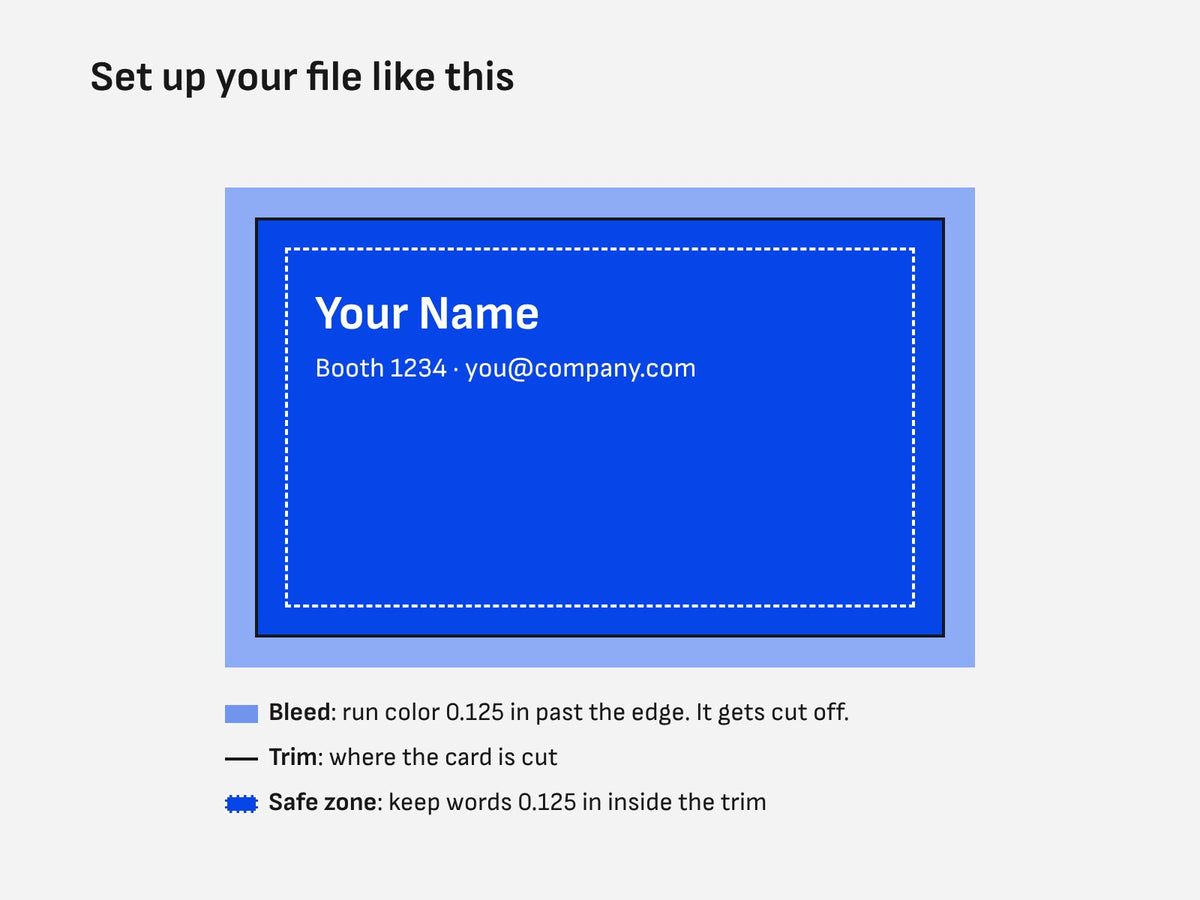
Print is trimmed after it's printed. If your background or a photo runs to the edge, extend it 0.125 in past the edge on every side. That's bleed. Without it, a tiny shift in the cut can leave a thin white line.
Trim and bleed sizes
| Piece | Finished size | File size with bleed |
|---|---|---|
| Business card | 3.5 x 2 in | 3.75 x 2.25 in |
| Rack card | 3.67 x 8.5 in | 3.92 x 8.75 in |
| Postcard | 4 x 6 in | 4.25 x 6.25 in |
| Half page flyer | 5.5 x 8.5 in | 5.75 x 8.75 in |
| Letter flyer | 8.5 x 11 in | 8.75 x 11.25 in |
| Brochure (flat, before folding) | 8.5 x 11 in | 8.75 x 11.25 in |
Posters, foam boards, stickers and the retractable banner each have their own setup. Email us at atlevents@atleventprints.com before you design one and we'll tell you what to send.
Safe zone: keep words away from the edge
Keep text, logos and QR codes at least 0.125 in inside the finished edge. That's a common rule in print, and more room is safer on a business card. Anything closer can get trimmed or look cramped.
Resolution: 300 at the size it prints
For cards, flyers and brochures, the common standard is 300 pixels per inch at the finished size. A logo pulled from a website is usually far less. It looks fine on a screen and soft on paper. Use the original logo file (AI, EPS, SVG or a vector PDF) when you have it.
Large signs are seen from farther away, so they can often use less. Ask us if you're not sure.
Color: design in CMYK
Screens make color with light. Paper uses ink. Most print is made with four inks, called CMYK. If you design in RGB, the colors are converted at print time and bright blues, greens and oranges can come out duller than they look on screen. Setting your file to CMYK from the start gives you fewer surprises. That's general print practice, and it's why you see a proof before we print.
Export a clean PDF
- Use your design app's print or press PDF preset.
- Turn on bleed (0.125 in). Crop marks aren't needed.
- Embed your fonts, or turn text to outlines.
- One file per design. For two-sided pieces, page 1 is the front and page 2 is the back.
Brochures and booklets
Brochures. On a tri-fold, the panel that folds in is a little narrower so it tucks in neatly. Start from a tri-fold template, not a page split into three equal parts.
Booklets. Saddle stitch booklets come in 8, 16 or 24 pages. Keep text a little farther from the center fold than from the outside edges, so nothing disappears into the spine.
Common mistakes
- No bleed, so a thin white edge shows after trimming
- Text too close to the edge
- A low resolution logo copied from a website
- The wrong phone number or web address (check every digit on the proof)
- Last year's booth number or show dates
- A QR code nobody tested. Scan it with two different phones before you upload.
Check your proof like it's the final
You approve a proof before anything is printed. Read it out loud. Check names, phone numbers, the web address, prices, dates and your booth number. Once you approve, it goes to print.
Showing in Atlanta?
Find your show on our Atlanta shows page, including the Atlanta Boat Show, Atlanta Market and IPPE.
Event printing in Atlanta for your show.
Free delivery to your Atlanta hotel.
Start your order
Questions
What size should my business card file be?
3.75 x 2.25 in. That's the 3.5 x 2 in card plus 0.125 in bleed on every side.
Can I send a Word or PowerPoint file?
Export it to PDF first. A print-ready PDF, JPG or PNG with 0.125 in bleed is what we take.
Do I see it before it prints?
Yes. You approve a proof before anything is printed.